Creating new SIM records for the archive
To accession new SIM cards to the collection, follow these steps
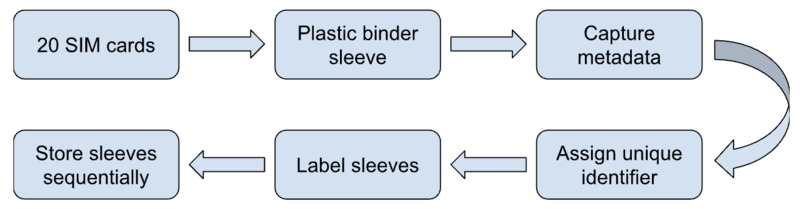
Stage 1: Portion 20 SIM Cards
Separate 20 SIM cards from the collection to be sleeved and accessioned.
Stage 2: Sleeve SIM Cards
Beginning in the upper left corner, place the 20 SIMs front-side up in the 20 pockets. For the purposes of this collection, the smooth face of the SIM card is the “front” and the opposite side with the metal chip is the “back.” When you fill one row, move to the row below, beginning again on the left side. For a visual representation, see below.
Stage 3: Document Media
Document the SIM by capturing the card's metadata, including a physical description of front and back including logos, handwritten labeling, colors, and identification strings. Note the subject, date, creator, coverage, language, format, and initials of the accessioning archivist.
Stage 4: Assign Unique Identifier
With underscores, combine the sleeve number, pocket number, and last five digits of the ICCID.
Stage 5: Label Sleeve
Label the sleeve with its corresponding number.
Stage 6: Store Sleeves Sequentially
Place sleeves in the binder sequentially, so that the first sleeve is at the beginning and the most recently accessioned the end.
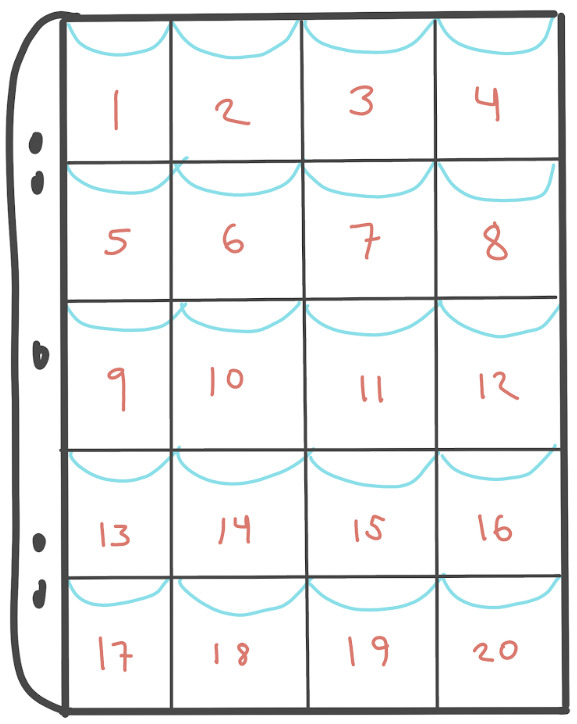
The above illustration represents a plastic SIM card sleeve. SIMs are placed in pockets from left to right, beginning in the upper left and ending in the lower right hand corners.